










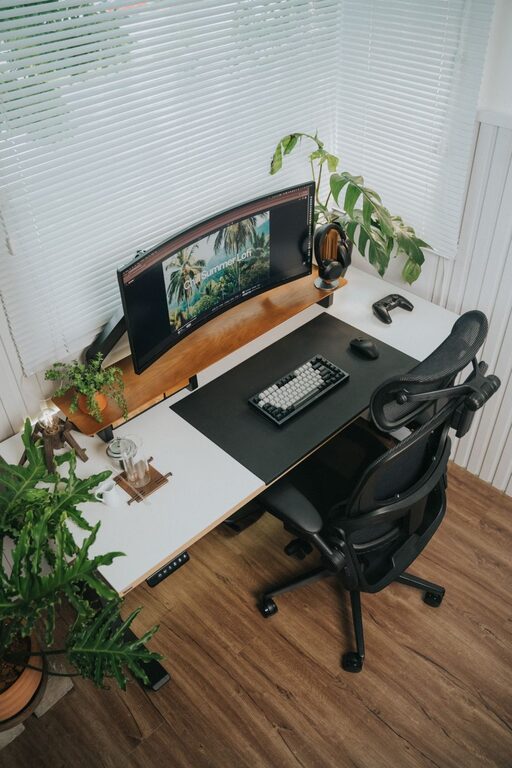
Creating the perfect desk setup can significantly improve your focus and comfort, whether you work from home, study, or simply spend long hours at your desk. A well-organized and ergonomic workspace not only helps reduce physical strain but also enhances productivity and mental clarity. In this post, we’ll explore practical tips to arrange your desk for maximum comfort and concentration.
Why a Good Desk Setup Matters
Before diving into the tips, it’s helpful to understand why your desk setup impacts focus and comfort. An uncomfortable workstation can cause fatigue, pain, and distractions, while a well-designed space promotes better posture, reduces stress, and keeps you engaged with your tasks.
Choosing the Right Desk and Chair
Desk Height and Size
Your desk should be at a height that allows your arms to rest comfortably at a 90-degree angle when typing or writing. A standard desk height is usually around 28 to 30 inches, but adjustable desks or sit-stand desks offer flexibility to change positions, which is excellent for comfort.
The desk surface should be spacious enough to hold your essentials—monitor, keyboard, mouse, notebooks, and other tools—without clutter. A clutter-free space reduces distractions and improves focus.
Ergonomic Chair
Invest in a supportive ergonomic chair that adjusts in height and offers lumbar support. Your feet should rest flat on the floor or on a footrest, and your knees should be level with or slightly lower than your hips. A good chair promotes proper posture and prevents back or neck pain.
Monitor Placement for Reduced Eye Strain
Position your monitor about an arm’s length away, with the top of the screen at or slightly below eye level. This angle helps keep your neck relaxed during long sessions and reduces eye strain.
If you use multiple monitors, align them at the same height and distance to avoid excessive head turning.
Keyboard and Mouse Setup
Place your keyboard and mouse close enough to prevent reaching or straining your shoulders. Your wrists should be straight and relaxed while typing or clicking. Consider using a wrist rest for added support.
Wireless keyboards and mice can reduce cable clutter, keeping your desk tidier.
Lighting Matters
Good lighting reduces eye strain and sets a productive mood. Place your desk near a window to use natural light if possible, but avoid glare on your screen.
Use adjustable desk lamps with warm or neutral white light for focused tasks, and avoid harsh overhead lighting. Position lamps to the side opposite your dominant hand to minimize shadows.
Organize for Efficiency
Declutter Regularly
Keep only items you frequently use on your desk. Store other supplies in drawers or organizers to keep the surface clean.
Use Desk Organizers
Invest in small trays, pen holders, and file organizers to keep stationery and papers sorted. A tidy desk reduces mental clutter and helps you find things quickly.
Cable Management
Loose cables can be distracting and create a messy environment. Use cable clips, ties, or sleeves to keep cords neat and out of the way.
Personalize Your Space
Adding a few personal touches, such as a small plant, a favorite photo, or inspirational quotes, can make your workspace inviting and boost your mood. However, avoid excessive decorations that can overwhelm your desk.
Incorporate Movement
Sitting for extended periods can be tiring and unhealthy. If possible, use a sit-stand desk to alternate standing and sitting throughout the day.
Take short breaks every hour to stretch or walk around. Consider placing your printer or trash bin a little farther away to encourage movement.
Maintain Good Posture
Keep your back straight, shoulders relaxed, and head aligned over your spine. Regularly check your posture and adjust your chair or desk setup as needed.
Using reminders or apps that prompt posture checks can help you stay mindful.
Final Thoughts
A desk setup that supports focus and comfort doesn’t have to be complicated or expensive. By paying attention to ergonomics, lighting, organization, and personalization, you can create a workspace that helps you stay productive and physically comfortable throughout your day.
Start with small changes, observe what works best for you, and adjust as needed. Your body and mind will thank you!